
Which battery fits your key?
| Year and remote | Battery | How to identify it |
|---|---|---|
| 2016–2019 · Conventional key | CR1620 | Fixed metal blade and a small screw in the fob case. |
| 2016–2019 · Smart Entry remote | CR2032 | The emergency key slides out of the remote body. |
| Selected 2022–2026 · Smart remote | CR2032 | Find the year-specific opening method in the battery reference. |
2016 key instructions · PDF p. 4862024 key instructions · PDF p. 619
Coin cells can cause severe injuries if swallowed. Keep new and used batteries away from children and seek emergency medical help immediately if you suspect a battery was swallowed.
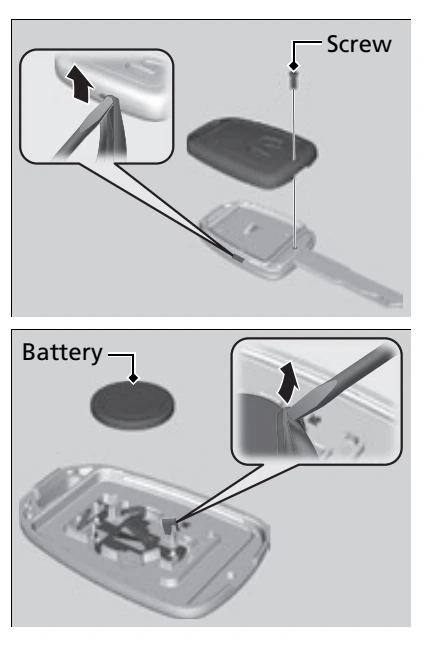
2016 · Conventional key · CR1620
Fixed metal blade and a small screw in the fob case.
- Remove the small case screwUse a small Phillips screwdriver. Keep the screw where you can find it.
- Open the transmitter housingGently pry at the illustrated seam with a cloth-covered flat-tip tool.
- Replace the CR1620Follow the original cell’s orientation and the battery compartment markings. Reassemble the case and test the buttons.
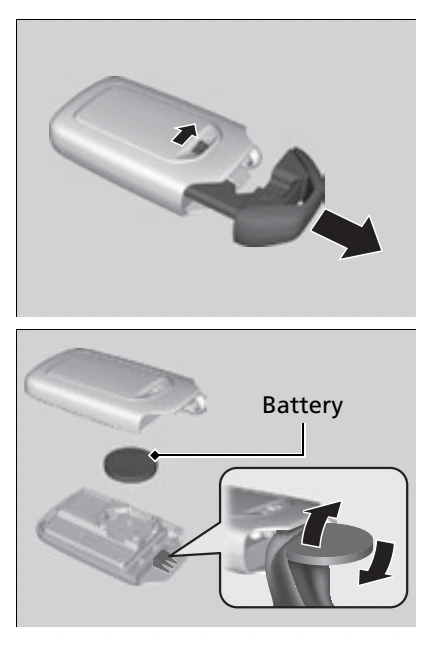
2016 · Smart Entry remote · CR2032
The emergency key slides out of the remote body.
- Release the built-in keyUse the release on the remote and slide the metal key out.
- Separate the cover with a cloth-wrapped coinUse the slot illustrated in Honda’s manual. Keep the loose buttons in place.
- Replace the CR2032Match the polarity in the battery compartment. Snap the case back together, return the key and test the remote.
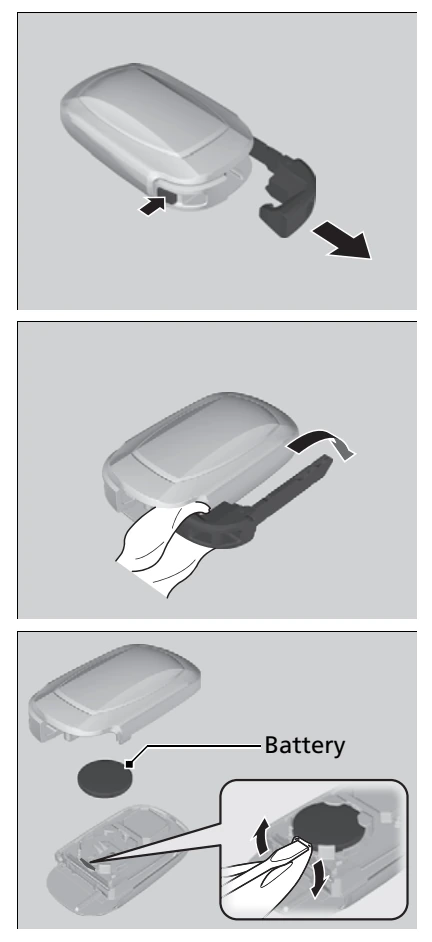
2024 · Gasoline and Hybrid · CR2032
Smart remote with a removable emergency key. The opening method uses the key grip.
- Remove the built-in keySlide out the metal insert using the release.
- Use the key grip at the case slotProtect the grip with a cloth and pry gently at the slot shown in Honda’s drawing.
- Lift out the old cellUse a cloth-protected flat-tip screwdriver at its edge. Match the polarity when fitting the CR2032.
- Reassemble and testSeat the case halves fully, return the key and check lock and unlock.
Battery numbers and manual pages
| Remote | Battery | Owner’s manual |
|---|---|---|
| 2016–2019 · fixed blade with case screw | CR1620 | 2016 · 2017 · 2018 · 2019 |
| 2016–2019 · Smart Entry | CR2032 | 2016 · 2017 · 2018 · 2019 |
| 2022 Hybrid, 2024–2026 gas, 2026 Hybrid | CR2032 | 2022 Hybrid · 2024 · 2025 · 2026 · 2026 Hybrid |
The 2024 Hybrid also uses CR2032. 2024 Hybrid remote battery instructions.
If a weak remote prevents starting
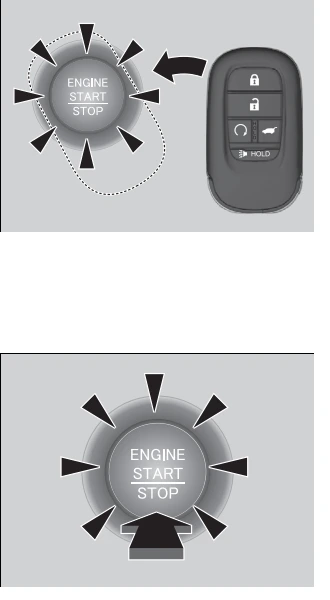
On Smart Entry cars, the dashboard can tell you to hold the remote near the start button. The backup start uses the Honda emblem side of the fob. A conventional CR‑V key uses the ignition cylinder.
| Model | What to do when the start button is flashing |
|---|---|
| 2016 Smart Entry | Touch the fob’s Honda emblem to the center of ENGINE START/STOP. After the beep and when the light stays on, press the brake and the start button within 10 seconds. Honda procedure |
| 2024 gas | Press ENGINE START/STOP to bring up the prompt. While the button flashes, touch it with the emblem side of the remote. After the beep, press the brake and the start button while the light is steady. Honda procedure |
Frequently asked questions
Do the two 2016 Honda CR‑V remotes use the same battery?
The screw-together key with a fixed metal blade uses CR1620. The 2016 Smart Entry remote uses CR2032. Check the marking on the old cell if the shell was replaced.
Why does the fob still fail after I changed the battery?
Check the battery code, the orientation and whether the case clicked shut. Test the spare fob if available. If the spare works but yours does not, the problem may be in the remote rather than the vehicle.
Can I unlock a 2024 CR‑V with a flat remote battery?
Use the removable key to unlock the driver’s door. Your model’s owner’s manual explains the emergency starting method.


