
Choose the controls in your CR‑V
| Model and controls | Reset method |
|---|---|
| 2016 · Select/Reset knob | Display Oil Life, hold the knob for 10 seconds, then hold again for 5. |
| 2016 · VEHICLE SETTINGS | Choose MAINTENANCE RESET, then RESET. |
| 2016 · i‑MID and SOURCE | Open Maintenance info, press SOURCE and confirm Yes. |
| 2017–2019 · TRIP knob or ENTER | Use the controls on your cluster or steering wheel to select the completed item. |
| 2024–2026 · Home and left selector wheel | Open Maintenance Minder, hold the wheel for about 10 seconds and select the item. |
Reset the reminder after completing the work shown.
2016 reset instructions · PDF p. 4472024 reset instructions · PDF p. 587
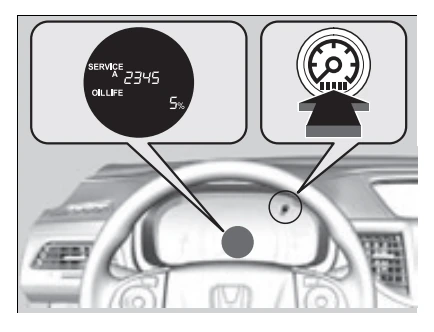
2016 · Instrument-panel knob
Use this if you see a physical Select/Reset knob by the gauges.
- Turn the ignition to ONPark and leave the engine off.
- Bring up the oil percentagePress the knob repeatedly until Oil Life appears.
- Enter reset modeHold the knob for at least 10 seconds, until the percentage and item codes flash. Release it.
- Set the display back to 100%Hold the knob again for at least 5 seconds. The service codes clear and the display shows 100%.
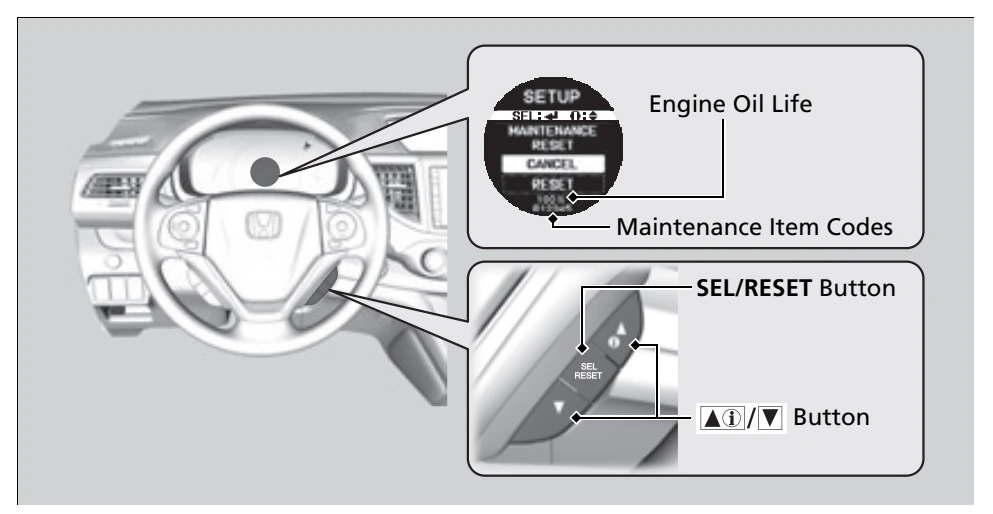
2016 · VEHICLE SETTINGS display
Use this if the information buttons and SEL/RESET button navigate a VEHICLE SETTINGS menu in the instrument cluster.
- Switch the vehicle to ONKeep the vehicle parked with the engine off.
- Go to VEHICLE SETTINGSUse the information buttons to highlight the menu. Press SEL/RESET to enter.
- Open MAINTENANCE RESETChoose it with the information buttons and press SEL/RESET.
- Select RESETPress SEL/RESET to confirm. Check that the Oil Life percentage reads 100%.
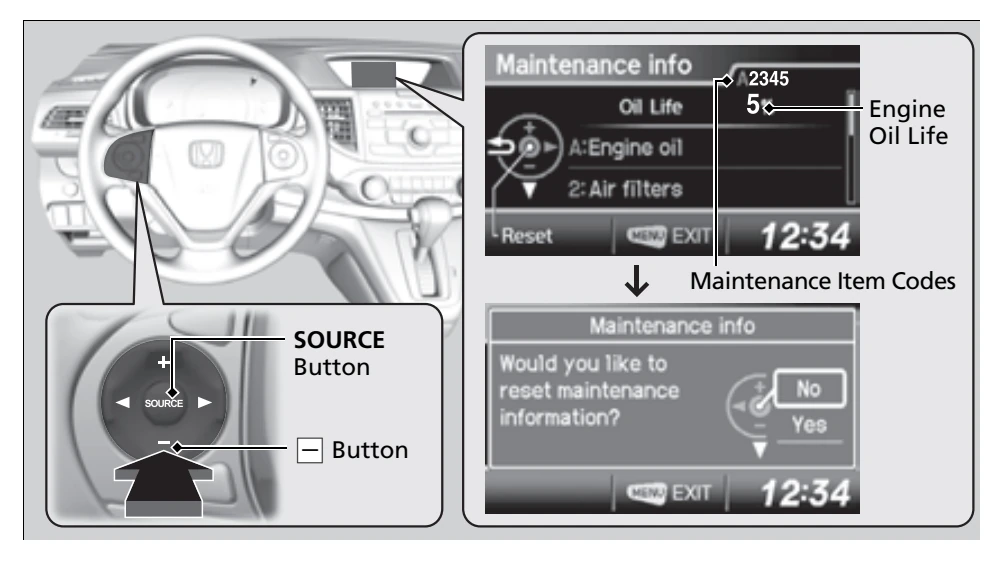
2016 · i-MID center screen
Use this if your center display has a Maintenance info screen and the steering wheel has a SOURCE button.
- Switch the ignition to ONStay parked with the engine off.
- Open Maintenance infoUse the steering-wheel MENU and the selection buttons to find Maintenance info on the i-MID.
- Press SOURCE on the Maintenance info screenThe display opens the reset prompt.
- Choose Yes using the minus buttonPress SOURCE to confirm. Verify the oil life returned to 100%.
CR‑V reset with TRIP or ENTER
| What you see | How to reset | Honda instructions |
|---|---|---|
| TRIP knob in the cluster | With the vehicle stopped, switch the ignition to ON. Press TRIP until Maintenance Minder is shown. Hold the knob for at least 10 seconds. Turn the knob to select the completed item, then hold it for at least five seconds. | 2017 · 2018 · 2019 |
| Display/Information and ENTER on the wheel | Set the power mode to ON. Use Display/Information to bring up the Maintenance Minder screen and press ENTER. Hold ENTER for about 10 seconds. Highlight the completed item and press ENTER again. | 2017 · 2018 · 2019 |
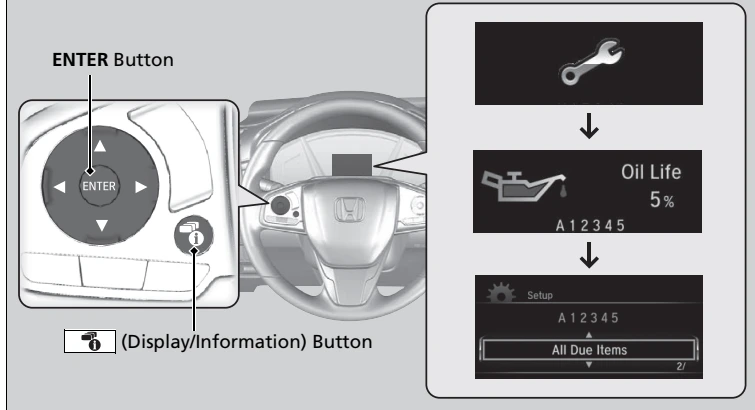
On displays that let you choose an item, use All Due Items only when every listed job was completed.
2020 and 2022 Hybrid: Use the Display/Information and ENTER procedure above. Compare the steering wheel and screen to 2020 Hybrid · PDF p. 583 or 2022 Hybrid · PDF p. 587.
CR‑V reset with Home and the left selector wheel
On 2024 U.S. gasoline and Hybrid models, use Home and the left selector wheel on the steering wheel.
- Set power mode to ONPark and use the driver display.
- Open Maintenance MinderPress Home. Roll the left selector wheel to the wrench and press the wheel to open it.
- Enter reset modeHold the left selector wheel down for about 10 seconds.
- Reset the completed itemChoose the maintenance item and press the wheel. Use All due items only after every listed task has been completed.
- Check what clearedThe items you reset clear individually. Repeat for any other work you completed.
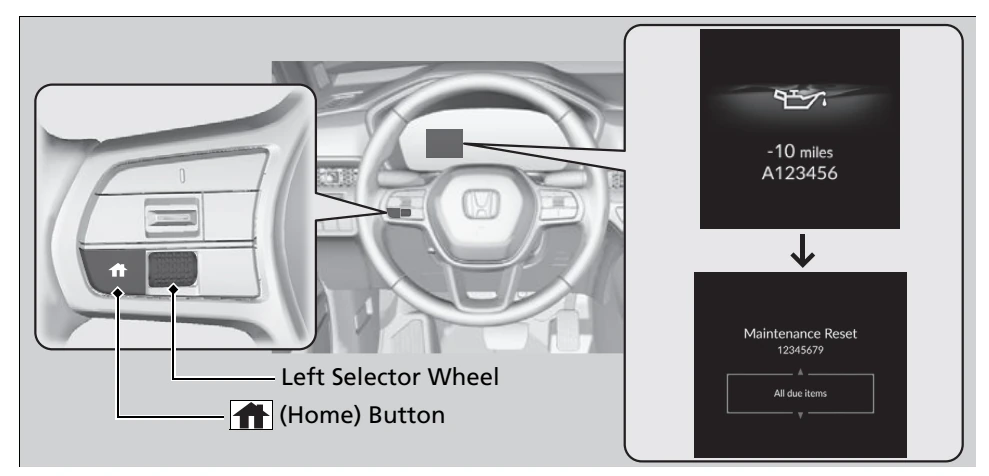
Honda also documents a vehicle-settings route for supported displays. If the controls differ, check the matching manual’s Resetting the Display section.
2025 gasoline, 2026 gasoline and 2026 Hybrid: Honda documents the same Home and left selector wheel method. See 2025 gas · PDF p. 585, 2026 gas · PDF p. 501 or 2026 Hybrid · PDF p. 630.
Frequently asked questions
Why did the maintenance code stay on after the oil change?
On the 2024 CR‑V, resetting an oil-related item can leave other service items due. Compare the code with the jobs actually completed before clearing anything else.
What if my 2016 CR‑V has no Select/Reset knob?
Look for the VEHICLE SETTINGS cluster menu or the i‑MID Maintenance info screen. The steps depend on the display and its controls.
Is the oil life percentage the oil level?
Oil Life estimates the remaining service interval. Check the engine oil level separately. If a red oil-pressure warning appears, pull over safely and follow your owner’s manual.


